More powerful compression, folder-level progress tracking, and simplified server administration.
We are excited to announce that NXPowerLite Server 11 is officially available!
This major update brings our updated compression engine alongside high-demand administrative features. Server 11 delivers deeper file reduction across your entire file server while giving you clear, real-time visibility into background compression tasks.
Enhanced Compression Engine (SDK 11)
At the core of Server 11 is our new SDK 11 compression engine, engineered to squeeze even more space from PDF, Microsoft Office, and image files.
Key engine enhancements include:
Excel Cell Pictures: Full compression support for images embedded directly inside Excel grid cells.

NOTE: The picture-in-cell feature was added to Excel in 2023, and the native Microsoft compress pictures feature does not compress them. This makes them a substantial source of file bloat. To check if a picture is placed in the cells, rather than over them, right-click on the picture and check the menu options. If you have a “Picture in Cell” option (shown above) then it is placed in cell.
Grouped Word Images: Expanded ability to compress grouped shapes and graphic elements in Word documents.
PDF JPEG2000 Support: Native parsing and reduction of high-resolution JPEG2000 image streams inside PDF documents.
64-bit Native Processing: Full 64-bit architecture for improved stability, especially when handling large files.
PNG Color Profiles: Preserves ICC profiles when resizing or quantizing PNGs, ensuring your images maintain their exact original colors.
For the full breakdown of underlying engine improvements, check out our detailed SDK 11 Engine Overview.
Activity Summary: Folder-Level Progress Snapshot
Tracking compression progress across massive file structures is now significantly simpler. Server 11 introduces a dedicated Activity Summary dialog, accessible straight from the Reports menu.
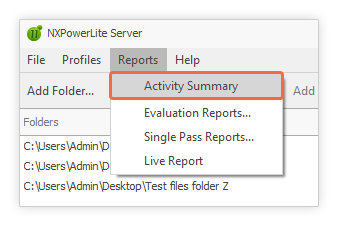
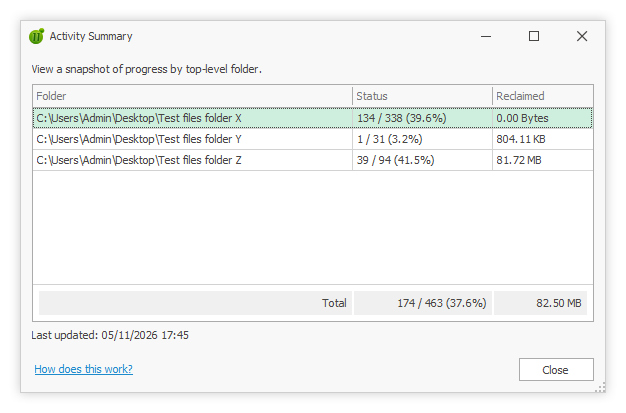
This view provides IT administrators with a live status snapshot broken down by top-level folder:
Files Processed: View exact counts of completed files versus total candidate files.
Percentage Complete: Monitor real-time completion percentages across individual root directories.
Space Reclaimed: See exact storage savings (in MB or GB) generated per top-level folder.
The Activity Summary reads from a lightweight, dedicated database table designed to update continuously without impacting active scanning performance.
Administrative & UI Enhancements
Server 11 introduces several key interface refinements to streamline configuration and operation.
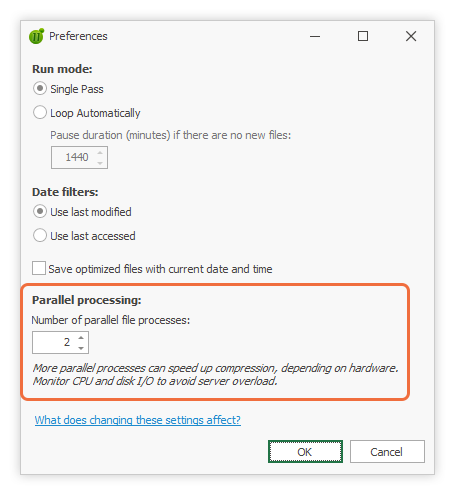
Parallel Processing Settings: Configure up to 20 concurrent optimizers* directly inside the Preferences dialog without needing to manually edit the Windows Registry.
* Administrators should avoid maxing out concurrent optimizers; review our optimizer configuration guide before increasing this limit.
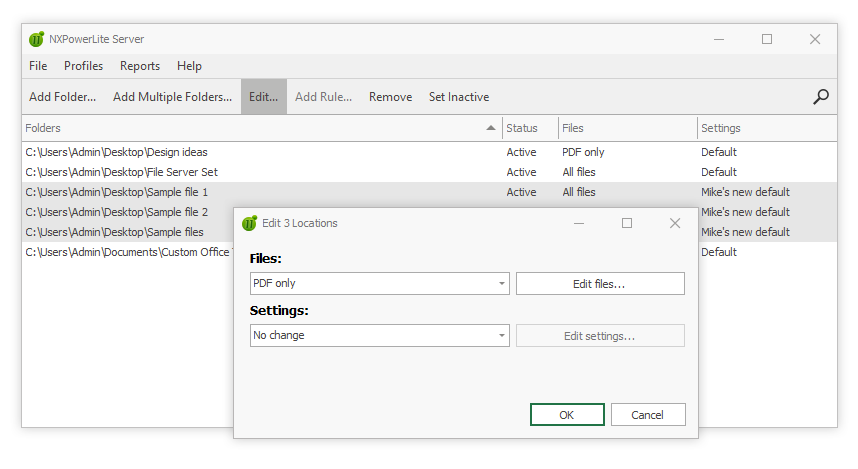
Multi-Location Editing: Select multiple folders in the dashboard and click Edit... to update file rules or settings profiles in a single action. Previously this had to be done one folder at a time. Read our support article for more information on managing folders and settings.
Streamlined Stopping Workflow: The stopping dialog now removes the ambiguous Cancel option, moving immediately into a pausing state so you can choose to pause or finish cleanly.
Upgrading to Server 11
Upgrading from NXPowerLite Server 10 is straightforward and preserves all existing folder paths, custom profiles, and history database records.
Default Profile Resolution Update
The built-in Default optimization profile now targets 1920x1200 resolution instead of 1600x1200. Folders assigned to the Default profile will automatically adopt this higher resolution upon upgrading. If you prefer to retain the 1600x1200 behavior, simply create a custom profile targeting 1600x1200 and assign it to your target locations.
Licensing & Migration Guide
Active subscription customers can upgrade immediately using their existing registration key. Perpetual license owners with active Annual Maintenance will receive new version 11 keys via email.
Re-Compressing Legacy Files
Server 11 includes updated engine logic capable of finding additional space in PDF and Office files previously processed by version 10 or earlier. You can trigger a re-compression scan simply by clearing the file history for those specific formats in the Dashboard.
For step-by-step guidance on how to ensure files get recompressed and full upgrade steps, refer to our complete Server 11 Migration Guide.
NOTE: Clearing this data ensures previously compressed files will be processed by NXPowerLite again. However, there will be a performance impact while it retries all those older files.
Ready to Try NXPowerLite Server 11?
Reclaim primary storage space and keep file bloat under control across your Windows servers.
Download a free, fully functional evaluation from the NXPowerLite Server Product Page. If you have questions about sizing, deployment, or upgrading your existing environment, please Contact us.